Hi Everyone,
Recently some of our customer started reporting an issue with Google Chrome, while printing reports it cuts the page and does not display details. Also it may hide images embedded into PDF report format. IE and Mozilla FireFox works perfectly fine.
We have checked with Chromium team, found that this issue is a known bug and they work on it. But until the fix is deployed you can use a workaround.
Main sense is to disable built in PDF Viewer and replace it with external plug-in from Adobe. System will still open PDF inside the browser, but without any glitches.
Chromium team, please hurry up :)
Ok, the workaround is to install Adobe PDF Reader on your PC.
Then, once you confirmed you are running the latest Chrome and Adobe Reader, and if issue is still there please try this:
1. Open Chrome and type this into address bar: chrome://plugins/
It will open plugin page.
2. You should see a list of all the Plug-ins installed for Chrome, please find one called Chrome PDF Viewer plugin, it may look like this:
3. Please make this plugin grayed out (disabled) by clicking on Disable link:
4. After that it should show you this
5. It will now save you a file locally on your PC for viewing by ordinary PDF reader.
If saving a file locally is not preferred option you may do it another way.
1. Install Adobe PDF Reader. Open Chrome and type this into address bar: chrome://plugins/
2. Find the Adobe Reader plugin.
3. And make it Enabled
4. Please note that Built In Chrome PDF Viewer should be disabled in this configuration:
All the best,
Sergey.
What is happening with web based ERP in South East Asia. Specifically Acumatica, including cloud version deployed on MS Azure platform. In both, SaaS and on-premise delivery methods.
Wednesday, February 20, 2013
Monday, January 21, 2013
Disclosure Controls and Internal Audit. Acumatica and SOX.
Hi Everyone,
Starting from version 4.0 we are implementing Audit History function, that is designed to help in Assessment of internal control, as per Sarbanes–Oxley Section 404.
As per SOX 404 TDRA:
1. - We have extended structure of accounts/subaccounts/business accounts, as well as company entities.
2. - This part is usually done during system implementation and security elements should be tuned according to the risks.
3. - Entity level controls are as well secured in version 3.0. We can specify to restrict or allow access on entity level as well as on reporting element level.
4. - This is achieved by transactional level security.
So almost all the items were available in version 3.0. Except - 5. There was no clear evidence of specific transactions modification. Yes we had time/date when transaction was created or last modified. But there was no historical data kept for the modifications made.
Starting version 4.0 we added Audit History capability, that tracks ALL the changes made to any record in the system. This function require a setup before activation.
All the best,
Sergey
Starting from version 4.0 we are implementing Audit History function, that is designed to help in Assessment of internal control, as per Sarbanes–Oxley Section 404.
As per SOX 404 TDRA:
Key steps to implement such control include:
- Identifying significant financial reporting elements (accounts or disclosures)
- Identifying material financial statement risks within these accounts or disclosures
- Determining which entity-level controls would address these risks with sufficient precision
- Determining which transaction-level controls would address these risks in the absence of precise entity-level controls
- Determining the nature, extent, and timing of evidence gathered to complete the assessment of in-scope controls
1. - We have extended structure of accounts/subaccounts/business accounts, as well as company entities.
2. - This part is usually done during system implementation and security elements should be tuned according to the risks.
3. - Entity level controls are as well secured in version 3.0. We can specify to restrict or allow access on entity level as well as on reporting element level.
4. - This is achieved by transactional level security.
So almost all the items were available in version 3.0. Except - 5. There was no clear evidence of specific transactions modification. Yes we had time/date when transaction was created or last modified. But there was no historical data kept for the modifications made.
Starting version 4.0 we added Audit History capability, that tracks ALL the changes made to any record in the system. This function require a setup before activation.
All the best,
Sergey
Tuesday, January 8, 2013
Multiple Column Report. For Example - Payment Remittance.
Here is a method of adding fixed number of columns into a report. In my case Additional Remittance Form report, which is often printed after or when check is issued.
PayNb PayDoc CompanyID RowNumber InvRefNbr1 InvRefNbr2 InvRefNbr3
--------------- ------ ----------- ----------- --------------- --------------- ---------------
000001 CHK 2 1 038630
000002 CHK 2 1 038631
000003 CHK 2 1 038632
000005 CHK 2 2 038652
000005 CHK 2 1 038648
000005 CHK 2 1 038649
000005 CHK 2 1 038650
000004 QCK 2 1 000004
Sometimes we need to list all the Bills, the check is paid for.
In certain format. In my case in 3 (Three) columns.
For example for check 00100002 we have 4 Bills attached:
In certain format. In my case in 3 (Three) columns.
For example for check 00100002 we have 4 Bills attached:
Well, I know, it will be good to show how much exactly each bill is paid for, but this is minor.
Lets achieve first multiple column printing.
First of all, I would need a View in a database, that will return 3 Bill Numbers in a row, in a sequential order.
If I used standard select
select p.RefNbr,i.CompanyID, i.DocType, i.RefNbr
from APPayment p inner join APAdjust a on p.CompanyID = a.CompanyID and
p.DocType = a.AdjgDocType and p.RefNbr = a.AdjgRefNbr
inner join APInvoice i on p.CompanyID = i.CompanyID and a.AdjdDocType = i.DocType and
i.RefNbr = a.AdjdRefNbr
It will just list me all the Payments from AP with corresponding Bills:
RefNbr CompanyID DocType RefNbr
--------------- ----------- ------- ---------------
000001 2 INV 038630
000002 2 INV 038631
000003 2 INV 038632
000005 2 ACR 038652
000005 2 INV 038648
000005 2 INV 038649
000005 2 INV 038650
000004 2 QCK 000004
Well, it shows for Check 000005 we have 3 Bills and 1 Credit Adjustment. This relates to my example above with what we actually want to achieve.
Second step would be - we need to add a numeric counter, to count the order of those rows. In my case from 1 to 4 for highlighted rows. Will also be good to add a type of Check, as we may have different.
Lets rework our view:
select p.RefNbr as PayNbr, p.DocType, i.CompanyID as CompanyID, i.DocType as InvDocType, i.RefNbr as InvRefNbr
from APPayment p inner join APAdjust a on p.CompanyID = a.CompanyID and
p.DocType = a.AdjgDocType and p.RefNbr = a.AdjgRefNbr
inner join APInvoice i on p.CompanyID = i.CompanyID and a.AdjdDocType = i.DocType and
i.RefNbr = a.AdjdRefNbr
order by i.RefNbr
PayNbr DocType CompanyID InvDocType InvRefNbr
--------------- ------- ----------- ---------- ---------------
000004 QCK 2 QCK 000004
000001 CHK 2 INV 038630
000002 CHK 2 INV 038631
000003 CHK 2 INV 038632
000005 CHK 2 INV 038648
000005 CHK 2 INV 038649
000005 CHK 2 INV 038650
000005 CHK 2 ACR 038652
Ok, now lets add a counter, generic rule will be to create a special RowNumber field:
SELECT Bill Number, other fields, Check Number
(SELECT COUNT(*) FROM table t2 WHERE t2.Bill Number <= t.Bill Number and t2.Check Number = t.Check Number) AS RowNumber
FROM Table t
ORDER BY Bill Number
Here is what our view will become:
select p.RefNbr as PayNbr, p.DocType, i.CompanyID as CompanyID, i.DocType as InvDocType, i.RefNbr as InvRefNbr,
(SELECT COUNT(*) FROM APPayment p2 inner join APAdjust a2 on p2.CompanyID = a2.CompanyID and
p2.DocType = a2.AdjgDocType and p2.RefNbr = a2.AdjgRefNbr
inner join APInvoice i2 on p2.CompanyID = i2.CompanyID and a2.AdjdDocType = i2.DocType and
i2.RefNbr = a2.AdjdRefNbr WHERE i2.RefNbr <= i.RefNbr AND p2.RefNbr = p.RefNbr and a2.AdjgDocType = a.AdjgDocType) AS rownumber
from APPayment p inner join APAdjust a on p.CompanyID = a.CompanyID and
p.DocType = a.AdjgDocType and p.RefNbr = a.AdjgRefNbr
inner join APInvoice i on p.CompanyID = i.CompanyID and a.AdjdDocType = i.DocType and
i.RefNbr = a.AdjdRefNbr
order by i.RefNbr
PayNbr Type CompanyID InvDocType InvRefNbr rownumber
--------------- ------- ----------- ---------- --------------- -----------
000004 QCK 2 QCK 000004 1
000001 CHK 2 INV 038630 1
000002 CHK 2 INV 038631 1
000003 CHK 2 INV 038632 1
000005 CHK 2 INV 038648 1
000005 CHK 2 INV 038649 2
000005 CHK 2 INV 038650 3
000005 CHK 2 ACR 038652 4
Here we have a number 1 to 4. Now we have more complicated task - to arrange these Invoice Numbers into 3 columns, within a single row. To make it simpler, I assume that no check will pay for more than 3000 invoices. This is realistic example. Formula to describe all the sequential numbers that will fall into respective columns will be
1. Column One: N1 = a*3-2. Where N1 are numbers to fall into column 1, and a - is the number of row.
For example for row 1 number should be 1, for row 2 number would be 4, because number 2 will go for column 2, and number 3 will go for column 3. Same way for columns 2 and 3.
2. Column Two: N2 = a*3-1
3. Column Three: N3 = a*3
Based on above, invoice 038648 should go to row 1 column 1, 038649 to row 1 column 2, 038650 to row 1 column 3 and last 038652 should jump to row 2 and column 1. The other words, sequential number 1 corresponds col 1 row 1, 2 = col2 row 1, 3= col3 row 1 and 4 = col1 row 2.
To help me to arrange this logic within a view, I will create 3 tables, each with sequential numbers. And each table will have only numbers that corresponds to columns 1, 2 and 3 respectively.
CREATE TABLE [dbo].[XSW_Column1_Of3](
[Counting] [int] NOT NULL
) ON [PRIMARY]
GO
CREATE TABLE [dbo].[XSW_Column2_Of3](
[Counting] [int] NOT NULL
) ON [PRIMARY]
GO
CREATE TABLE [dbo].[XSW_Column3_Of3](
[Counting] [int] NOT NULL
) ON [PRIMARY]
GO
Now I will populate them using this script, again, its in assumption that we will have up to 3,000 bills per check:
declare @i as int
set @i = 1
while @i <= 1000
BEGIN
insert XSW_Column1_Of3
SELECT @i*3-2
insert XSW_Column2_Of3
select @i*3-1
insert XSW_Column3_Of3
select @i*3
SELECT @i = @i +1
END
Now lets create a view with Raw data for all 3 columns:
Create VIEW XSW_APRemitRaw
AS
SELECT r.PayNbr, r.PayDoc, r.CompanyID, ROUND((r.rownumber+2)/3,0) as RowNumber,
InvRefNbr1 = CASE WHEN r.rownumber in (select Counting from XSW_Column1_Of3) THEN r.InvRefNbr ELSE '' END,
InvRefNbr2 = CASE WHEN r.rownumber in (select Counting from XSW_Column2_Of3) THEN r.InvRefNbr ELSE '' END,
InvRefNbr3 = CASE WHEN r.rownumber in (select Counting from XSW_Column3_Of3) THEN r.InvRefNbr ELSE '' END
FROM (select p.RefNbr as PayNbr, p.DocType as PayDoc, i.CompanyID as CompanyID, i.DocType as InvDocType, i.RefNbr as InvRefNbr,
(SELECT COUNT(*) FROM APPayment p2 inner join APAdjust a2 on p2.CompanyID = a2.CompanyID and
p2.DocType = a2.AdjgDocType and p2.RefNbr = a2.AdjgRefNbr
inner join APInvoice i2 on p2.CompanyID = i2.CompanyID and a2.AdjdDocType = i2.DocType and
i2.RefNbr = a2.AdjdRefNbr WHERE i2.RefNbr <= i.RefNbr AND p2.RefNbr = p.RefNbr and a2.AdjgDocType = a.AdjgDocType) AS rownumber
from APPayment p inner join APAdjust a on p.CompanyID = a.CompanyID and
p.DocType = a.AdjgDocType and p.RefNbr = a.AdjgRefNbr
inner join APInvoice i on p.CompanyID = i.CompanyID and a.AdjdDocType = i.DocType and
i.RefNbr = a.AdjdRefNbr) r
Create VIEW XSW_APRemitRaw
AS
SELECT r.PayNbr, r.PayDoc, r.CompanyID, ROUND((r.rownumber+2)/3,0) as RowNumber,
InvRefNbr1 = CASE WHEN r.rownumber in (select Counting from XSW_Column1_Of3) THEN r.InvRefNbr ELSE '' END,
InvRefNbr2 = CASE WHEN r.rownumber in (select Counting from XSW_Column2_Of3) THEN r.InvRefNbr ELSE '' END,
InvRefNbr3 = CASE WHEN r.rownumber in (select Counting from XSW_Column3_Of3) THEN r.InvRefNbr ELSE '' END
FROM (select p.RefNbr as PayNbr, p.DocType as PayDoc, i.CompanyID as CompanyID, i.DocType as InvDocType, i.RefNbr as InvRefNbr,
(SELECT COUNT(*) FROM APPayment p2 inner join APAdjust a2 on p2.CompanyID = a2.CompanyID and
p2.DocType = a2.AdjgDocType and p2.RefNbr = a2.AdjgRefNbr
inner join APInvoice i2 on p2.CompanyID = i2.CompanyID and a2.AdjdDocType = i2.DocType and
i2.RefNbr = a2.AdjdRefNbr WHERE i2.RefNbr <= i.RefNbr AND p2.RefNbr = p.RefNbr and a2.AdjgDocType = a.AdjgDocType) AS rownumber
from APPayment p inner join APAdjust a on p.CompanyID = a.CompanyID and
p.DocType = a.AdjgDocType and p.RefNbr = a.AdjgRefNbr
inner join APInvoice i on p.CompanyID = i.CompanyID and a.AdjdDocType = i.DocType and
i.RefNbr = a.AdjdRefNbr) r
PayNb PayDoc CompanyID RowNumber InvRefNbr1 InvRefNbr2 InvRefNbr3
--------------- ------ ----------- ----------- --------------- --------------- ---------------
000001 CHK 2 1 038630
000002 CHK 2 1 038631
000003 CHK 2 1 038632
000005 CHK 2 2 038652
000005 CHK 2 1 038648
000005 CHK 2 1 038649
000005 CHK 2 1 038650
000004 QCK 2 1 000004
Well I modified a RowNumber a little bit to show not Sequential number but Actual Row by adding ROUND((r.rownumber+2)/3,0) as RowNumber statement. I need it for aggregation.
Now final step, lets aggregate the view into single row.
Create VIEW XSW_APRemittance
AS
select PayNbr, PayDoc, CompanyID, RowNumber, MAX(InvRefNbr1) as Inv1, MAX(InvRefNbr2) as Inv2, MAX(InvRefNbr3) as Inv3
from XSW_APRemitRaw
group by PayNbr, PayDoc, CompanyID, RowNumber
go
PayNbr PayDoc CompanyID RowNumber Inv1 Inv2 Inv3
--------------- ------ ----------- ----------- --------------- --------------- ---------------
000001 CHK 2 1 038630
000002 CHK 2 1 038631
000003 CHK 2 1 038632
000004 QCK 2 1 000004
000005 CHK 2 1 038648 038649 038650
000005 CHK 2 2 038652
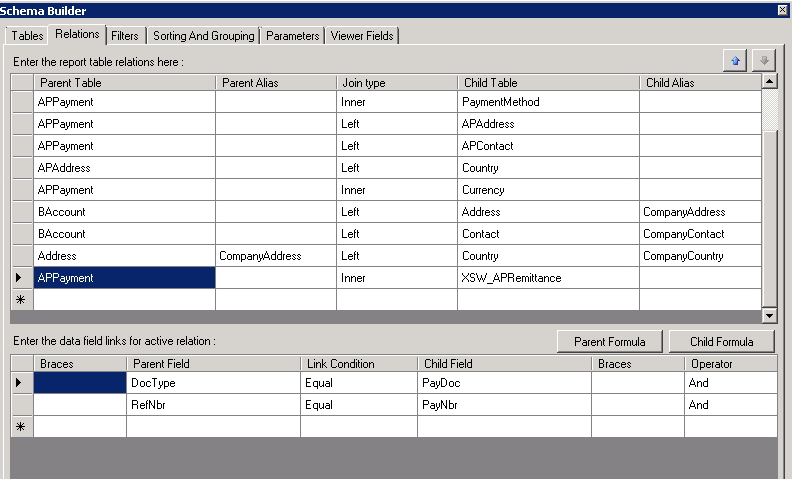
This is exactly what we need to add to report. Well I will skip adding a view to report, please refer to my earlier blogs for that. Just mention, Key fields should be PayNbr, PayDoc and RowNumber.
Added a group
And then added 3 fields to report
That is all,
Best Regards,
Sergey.
Sunday, December 23, 2012
Sunday, October 28, 2012
Acumatica Cloud ERP v4. What is New.
Hi Everyone.
Here I would like to discuss some new features that are to come in version 4.
Product is under beta testing, it goes very well and based on community opinion, will be a success.
Most significant change is enhanced Mobile Device support.
Now screens and menus re-size based on your device automatically. Below is example when Control Debit/Credit amount fields being repositioned automatically on screen width change.
Second great feature is Enhanced Navigation for screen touch devices. All the buttons being made a bit bigger to get easily pressed by finger. Menu had been reworked to allow to navigate by fingertip.
I have also noticed, reduced number of text labels, sometimes very annoying and complicating the action recognition. Please take a look at Grid buttons, They are now bigger and self explanatory. Of course tool tip is coming out when hover over the button.
Last thing - controls being repositioned and reworked, they all have the same width and come with description:
In overall, new approach reduced amount of code for developer 10 times. Numerous system enhancements improved the speed of operations locally by 30% as well on the server by 30%.
That is all about UI enhancements at the moment.
All the Best,
Sergey.
Here I would like to discuss some new features that are to come in version 4.
Product is under beta testing, it goes very well and based on community opinion, will be a success.
Most significant change is enhanced Mobile Device support.
Now screens and menus re-size based on your device automatically. Below is example when Control Debit/Credit amount fields being repositioned automatically on screen width change.
Second great feature is Enhanced Navigation for screen touch devices. All the buttons being made a bit bigger to get easily pressed by finger. Menu had been reworked to allow to navigate by fingertip.
I have also noticed, reduced number of text labels, sometimes very annoying and complicating the action recognition. Please take a look at Grid buttons, They are now bigger and self explanatory. Of course tool tip is coming out when hover over the button.
Last thing - controls being repositioned and reworked, they all have the same width and come with description:
In overall, new approach reduced amount of code for developer 10 times. Numerous system enhancements improved the speed of operations locally by 30% as well on the server by 30%.
That is all about UI enhancements at the moment.
All the Best,
Sergey.
Subscribe to:
Posts (Atom)