Hi Everyone,
Let me share recent Douglas Johnson video on Control Account feature in Acumatica:
Please be warned however, that even though this feature was introduced with option not to choose account as a control account.
It will always check on certain scenarios like Reversing a Bill, whether AP account is marked as control account or not.
It may cause issues if your customization are sensitive to warning messages.
So please take note. However in overall feature is a right one.
Thank you,
Sergey,
Showing posts with label Audit. Show all posts
Showing posts with label Audit. Show all posts
Monday, June 1, 2020

Tuesday, July 21, 2015
Major change in Cash Sale Document Numbering in version 5.
Hi Everyone,
If you were using Cash Sale screen in AR module in versions below 5.XX, you may have noticed that running number for the Document was generated based on AR Payment ID sequence.
Starting from version 5 the numbering sequence had changed to be AR Invoice ID Numbering for that type of document.
However, if you still wish to retain the existing order for your document numbers, you need to apply а customization below.
1. Create public class under your customization project for CashSales screen:

2. Change the field attribute to use the above class:

3. Save and Publish the customization.
From now on, Cash Sale Numbering will be taken from ARPayment sequence, as it was before.
Please note the same approach can be used for any AutoNumbering customizations in Acumatica.
All the best,
Sergey.
If you were using Cash Sale screen in AR module in versions below 5.XX, you may have noticed that running number for the Document was generated based on AR Payment ID sequence.
Starting from version 5 the numbering sequence had changed to be AR Invoice ID Numbering for that type of document.
However, if you still wish to retain the existing order for your document numbers, you need to apply а customization below.
1. Create public class under your customization project for CashSales screen:

2. Change the field attribute to use the above class:

3. Save and Publish the customization.
From now on, Cash Sale Numbering will be taken from ARPayment sequence, as it was before.
Please note the same approach can be used for any AutoNumbering customizations in Acumatica.
All the best,
Sergey.
Tuesday, April 15, 2014
Acumatica is not affected by Heartbleed
Hi Guys,
Basically that is it. We are not affected, because we use Microsoft IIS. So anyone using Acumatica on Azure, AWS or on premise is safe as we run on Microsoft Server OS, that has spend pretty much efforts and money on its own SSL encryption mechanism.
Most importantly, it is always monitored for viruses, and even if whatever virus will try to crash it, the very next day Microsoft would spread an update neutralizing it. Unlike Linux, where bug is for 2 years, still having an issue.
Here is the link to a nice article on ZDNet by Liam Tung, explaining it.
Heartbleed OpenSSL flaw - but Azure escapes
As Dorothy mentioned below, we have also put it in our comapny statement here:
Acumatica Official Statement
All the best and safe computing,
Sergey.
Basically that is it. We are not affected, because we use Microsoft IIS. So anyone using Acumatica on Azure, AWS or on premise is safe as we run on Microsoft Server OS, that has spend pretty much efforts and money on its own SSL encryption mechanism.
Most importantly, it is always monitored for viruses, and even if whatever virus will try to crash it, the very next day Microsoft would spread an update neutralizing it. Unlike Linux, where bug is for 2 years, still having an issue.
Here is the link to a nice article on ZDNet by Liam Tung, explaining it.
Heartbleed OpenSSL flaw - but Azure escapes
As Dorothy mentioned below, we have also put it in our comapny statement here:
Acumatica Official Statement
All the best and safe computing,
Sergey.
Wednesday, October 16, 2013
Solving the Problem with Data Retention.
Hi Guys,
In brief, I need your advise.
Got a problem with one of the prospect, willing to migrate from NetSuite to Acumatica.
They are now stacked to NS due to a legal requirements for data retention. Can you imagine!!!
You see, due to limited deployment models with Net Suite, they can not install the system on premise for historical usage, because they do not owe the license. So now they can not change the ERP from NS to anything else because if they unsubscribe from them - they will loose the whole system with all the customizations.
Even though the database can be extracted in some weird format, still they loose access to reports.
And for the audit they may need all the reports immediately based on auditor request.
Like, I know, what they would do if they decided to change ERP from Acumatica to something else, we allow to use unregistered license for two concurrent users, even if you unsubscribe from cloud or Subscription on Premise license. But NS do not allow that!
What to DO!!!! How to help them?
All the best,
Sergey.
In brief, I need your advise.
Got a problem with one of the prospect, willing to migrate from NetSuite to Acumatica.
They are now stacked to NS due to a legal requirements for data retention. Can you imagine!!!
You see, due to limited deployment models with Net Suite, they can not install the system on premise for historical usage, because they do not owe the license. So now they can not change the ERP from NS to anything else because if they unsubscribe from them - they will loose the whole system with all the customizations.
Even though the database can be extracted in some weird format, still they loose access to reports.
And for the audit they may need all the reports immediately based on auditor request.
Like, I know, what they would do if they decided to change ERP from Acumatica to something else, we allow to use unregistered license for two concurrent users, even if you unsubscribe from cloud or Subscription on Premise license. But NS do not allow that!
What to DO!!!! How to help them?
All the best,
Sergey.
Monday, October 14, 2013
Setting the Tax Right. Singapore.
Hi Everyone,
Here is a quick setup guide for Singapore GST Tax. Its all driven by IRAS requirements for tax codes and their behavior. Here is what tax report should include.

Here are what codes are recommended. From a guide for accounting software developers.

You can easily find these documents on IRAS web site.
In Acumatica ERP we are going to setup TAX module based on IRAS guidelines. Final Tax report should look based on above requirements.
1. Set up a tax Agency.
This is done in Accounts Payable module, just create a vendor for Comptroller of Goods and Services Tax in your system. Mark it as a Tax Agency, provide Period for report- in our case its Quarter. Then specify accounts for GST Input and Output Tax.


One important option here - I have chosen to report based on period in which documents are posted, not based on original invoice/bills dates.
2. Setup Tax Boxes for GST Report.
Remember the IRAS report format - we just need to setup in the system reporting settings and groups.
First we setup reporting boxes or lines:

Then we setup Groups:

Then for each group we have to specify the lines that we add, one by one.


Last two groups we made empty, due to non reporting nature of them.
3. Now lets setup Tax Codes.
Here is one example of the tax code, the rest are using the same logic, except inclusive ones.


For Inclusive tax, it uses different option Calculate On:

4. Setup Tax Categories and Tax Zones.
Recommended settings below. Tax categories then can be added to inventory or non stock items, while tax zones to vendors and customers.


And categories:


And the combination of Zones with Categories will end up with right Tax Codes.
All the best,
Sergey.
Here is a quick setup guide for Singapore GST Tax. Its all driven by IRAS requirements for tax codes and their behavior. Here is what tax report should include.

Here are what codes are recommended. From a guide for accounting software developers.

You can easily find these documents on IRAS web site.
In Acumatica ERP we are going to setup TAX module based on IRAS guidelines. Final Tax report should look based on above requirements.
1. Set up a tax Agency.
This is done in Accounts Payable module, just create a vendor for Comptroller of Goods and Services Tax in your system. Mark it as a Tax Agency, provide Period for report- in our case its Quarter. Then specify accounts for GST Input and Output Tax.


One important option here - I have chosen to report based on period in which documents are posted, not based on original invoice/bills dates.
2. Setup Tax Boxes for GST Report.
Remember the IRAS report format - we just need to setup in the system reporting settings and groups.
First we setup reporting boxes or lines:

Then we setup Groups:
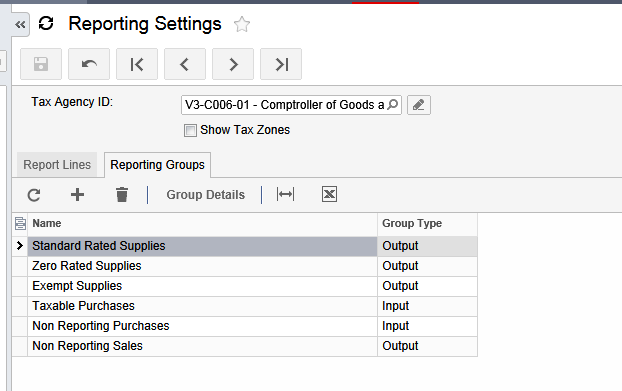
Then for each group we have to specify the lines that we add, one by one.


Last two groups we made empty, due to non reporting nature of them.
3. Now lets setup Tax Codes.
Here is one example of the tax code, the rest are using the same logic, except inclusive ones.


For Inclusive tax, it uses different option Calculate On:

4. Setup Tax Categories and Tax Zones.
Recommended settings below. Tax categories then can be added to inventory or non stock items, while tax zones to vendors and customers.


And categories:


And the combination of Zones with Categories will end up with right Tax Codes.
All the best,
Sergey.
Tuesday, May 28, 2013
Securing Web Configuration
Hi Everyone,
One of the questions from the audit team could be why do we keep some sensitive data in our configuration files. Luckily .NET provides fast and effective way of encrypting content of the web.config or machine.config files.
Of course if we use Windows Authentication, no data will be exposed in Web.Config, but just in case we need SQL based authentication to be used. Please use a simple script to encrypt content of the <connectionStrings> section of your web.config file.
1. Get the ID of your web site from the IIS Administration panel:

2. Open Command Prompt. Navigate to a folder where .NET resides and execute the following statement:
aspnet_regiis -pe connectionStrings -app / -site 9
Where connectionStrings is the area what we plan to encrypt, -app / means we have our site at root, and
-site 9 is the site ID.

Web.Config before the "surgery":

And After:

The only drawback of this - Configuration Tool, that is using local executable application, will not be able to find a database. But this I believe for good, you can control the attempt of changing configurations for the system.
If you need to decrypt the web.config, just run this statement:
aspnet_regiis -pd connectionStrings -app / -site 9
You Enjoy :) ,
Sergey.
One of the questions from the audit team could be why do we keep some sensitive data in our configuration files. Luckily .NET provides fast and effective way of encrypting content of the web.config or machine.config files.
Of course if we use Windows Authentication, no data will be exposed in Web.Config, but just in case we need SQL based authentication to be used. Please use a simple script to encrypt content of the <connectionStrings> section of your web.config file.
1. Get the ID of your web site from the IIS Administration panel:

2. Open Command Prompt. Navigate to a folder where .NET resides and execute the following statement:
aspnet_regiis -pe connectionStrings -app / -site 9
Where connectionStrings is the area what we plan to encrypt, -app / means we have our site at root, and
-site 9 is the site ID.

Web.Config before the "surgery":

And After:

The only drawback of this - Configuration Tool, that is using local executable application, will not be able to find a database. But this I believe for good, you can control the attempt of changing configurations for the system.
If you need to decrypt the web.config, just run this statement:
aspnet_regiis -pd connectionStrings -app / -site 9
You Enjoy :) ,
Sergey.
Monday, January 21, 2013
Disclosure Controls and Internal Audit. Acumatica and SOX.
Hi Everyone,
Starting from version 4.0 we are implementing Audit History function, that is designed to help in Assessment of internal control, as per Sarbanes–Oxley Section 404.
As per SOX 404 TDRA:
1. - We have extended structure of accounts/subaccounts/business accounts, as well as company entities.
2. - This part is usually done during system implementation and security elements should be tuned according to the risks.
3. - Entity level controls are as well secured in version 3.0. We can specify to restrict or allow access on entity level as well as on reporting element level.
4. - This is achieved by transactional level security.
So almost all the items were available in version 3.0. Except - 5. There was no clear evidence of specific transactions modification. Yes we had time/date when transaction was created or last modified. But there was no historical data kept for the modifications made.
Starting version 4.0 we added Audit History capability, that tracks ALL the changes made to any record in the system. This function require a setup before activation.

All the best,
Sergey
Starting from version 4.0 we are implementing Audit History function, that is designed to help in Assessment of internal control, as per Sarbanes–Oxley Section 404.
As per SOX 404 TDRA:
Key steps to implement such control include:
- Identifying significant financial reporting elements (accounts or disclosures)
- Identifying material financial statement risks within these accounts or disclosures
- Determining which entity-level controls would address these risks with sufficient precision
- Determining which transaction-level controls would address these risks in the absence of precise entity-level controls
- Determining the nature, extent, and timing of evidence gathered to complete the assessment of in-scope controls
1. - We have extended structure of accounts/subaccounts/business accounts, as well as company entities.
2. - This part is usually done during system implementation and security elements should be tuned according to the risks.
3. - Entity level controls are as well secured in version 3.0. We can specify to restrict or allow access on entity level as well as on reporting element level.
4. - This is achieved by transactional level security.
So almost all the items were available in version 3.0. Except - 5. There was no clear evidence of specific transactions modification. Yes we had time/date when transaction was created or last modified. But there was no historical data kept for the modifications made.
Starting version 4.0 we added Audit History capability, that tracks ALL the changes made to any record in the system. This function require a setup before activation.

All the best,
Sergey
Subscribe to:
Posts (Atom)