Showing posts with label Fixed Assets. Show all posts

Thursday, April 24, 2014

Adding Fixed Asset with History to FA Module.

Hi Everyone,

There was a question recently from one of the partners.
How to add asset that was depreciated previously to the system.
Here is a guide:

When adding asset with the existing accumulated depreciation we should indicate this fact at the moment of input. Let me demonstrate based on an example.

Adding "Land" Asset to a Fixed Asset module. Useful Life is 39 years, land was purchased 2 years ago. Original purchase price was 16,929.25 $. Accumulated depreciation to date is 868.17 $ for 24 month.
First of all, I assume we have added this asset to our books already, either by GL or via AP. We are not going to do any postings for open balance for such asset from FA->GL.

1.     Make Sure you have added Accumulated Depreciation for the asset for CR 868.17$ to AccDep A/C in GL, make sure you added DR 16,929.25$ for AssetCost A/C in GL, make sure you added DR 868.17 $ to Depreciation Expense A/C in GL. 


2.     We need to switch off GL Update to make it possible to add depreciation to the asset without additional postings to GL.


3.     At the main FA screen enter the asset particulars as below. Make sure you indicated Last Depreciation period of 02-2014 and Accumulated Depreciation of 868.17$


4.     Release the asset from Hold. Save. Look at the transaction History Tab. It created Purchasing, Recon and Depreciation Automatically. These transactions will not be going to GL.


5.     Now let’s take a look at Depreciation History Tab before and after Action->Calculate Depreciation.


After


6.     Now we can switch back GL Posting in FA Preferences Screen and try depreciating asset for 03-2014.


After transaction is being released we can see the result, sorry I skipped one month so my depreciation became doubled for that month J. Next month it will be back to normal.


Here it is


Now let’s take a look at the Balances


All the best,

Sergey.

Friday, May 10, 2013

Cloud Fixed Assets. Split, Transfer, Change of Useful Life, Accelerated Depreciation and more.

Hi Everyone.

In Acumatica version 4 FA module was greatly reworked and improved. Original goal was to make it better than JDE. You are the one to judge.

The module is used by KFC/Pizza Hut for nearly 20,000 assets around 200 locations island-wide. 

Here are some of the features that makes us distinct and unique among other ERP:

1. Asset Split.
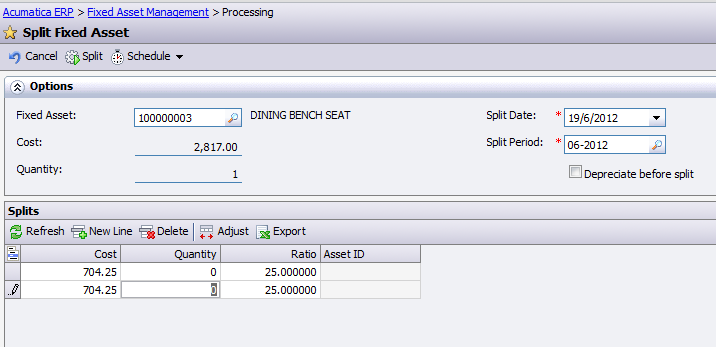
It is when we purchase assets in bulk, for example chairs for the restaurant, then entered it into our system as a Single Asset. Well you may not wish spent time labeling each chair individually, but rather put them in as a "lot number". It works fine until we need to shift part of these chairs to another location or even another shop...
One step solution for that - Asset Split process.


2.Asset Transfer. 
There could be a transfer of asset without changing the ownership, when sales purchase of asset is not needed. It can be between branches or Departments

Inter Departmental Transfer:


Second type is when we have to Sell the Asset in location A and re-purchase it at cost on location B.
Inter Brand transfer:

You may notice Disposal Method, that will be used to write off the asset during the transfer. Its because second method require sender company to get rid of asset in their books completely.

3. Change of Useful Life (UL).
There are two ways of changing the useful life of an asset. Either re-depreciate it from the beginning of life of the asset, and then, posting difference to the period of UL change.
Or use so called "accelerated depreciation" mode to spread remaining Net Book Value of the asset over remaining life of the asset proportionally. Depreciating in a nicer and more flat manner.
In Acumatica you are free to choose the method of changing UL for your assets:


4. Cost Additions and Deductions.
It is clear that some assets may get additions. Like for a PC we can buy a new HDD or RAM upgrade.
This is usually managed by changing the asset cost at certain point of parent asset life.
In Acumatica we have a dedicated transaction type and screen to process asset cost additions OR deductions.

5. Reports.
Here I just provide a list of reports we have:

All the Best,
Sergey.

Tuesday, June 19, 2012

Splitting an Asset.

Hi All,

Recently I got a request from one of our customers, what if we purchased 100 chairs, added then as a single asset, then later decided to split between 2 different places?

Immediate answer was - ok, may be you can dispose it and create a new one - tough way.

Then we decided to add a functionality to Acumatica Fixed Assets module, that does exactly what is stated in the header - Asset Splitting.

In fact the operation of Asset split is not simple. We should divide Accumulated Depreciation and Cost of Asset between spinoffs, however existing Depreciation Expenses should not get split. It simply because the new asset owner - would it be a place or department, may not wish to get incurred expenses from the previous one.

Also, we can use asset split if need to dispose asset partially.

So what this operation do - it takes the original asset, reduces its cost and accumulated depreciation, it also reduces quantity if it was more than 1 before split.
Then it creates a new spin off assets, as many as you decided during splitting, it can be just one spin off or multiple. All will get a fraction of a cost, then accumulated depreciaion.

Usefull Life of the spin offs should not change, it must follow the original asset. At least at the moment of split.

Thanks to our development team, we had implemented this functionality fast and accurate in version 3.0


All the best,

Sergey.