Here is a method of adding fixed number of columns into a report. In my case Additional Remittance Form report, which is often printed after or when check is issued.
Sometimes we need to list all the Bills, the check is paid for.
In certain format. In my case in 3 (Three) columns.
For example for check 00100002 we have 4 Bills attached:
Well, I know, it will be good to show how much exactly each bill is paid for, but this is minor.
Lets achieve first multiple column printing.
First of all, I would need a View in a database, that will return 3 Bill Numbers in a row, in a sequential order.
If I used standard select
select p.RefNbr,i.CompanyID, i.DocType, i.RefNbr
from APPayment p inner join APAdjust a on p.CompanyID = a.CompanyID and
p.DocType = a.AdjgDocType and p.RefNbr = a.AdjgRefNbr
inner join APInvoice i on p.CompanyID = i.CompanyID and a.AdjdDocType = i.DocType and
i.RefNbr = a.AdjdRefNbr
It will just list me all the Payments from AP with corresponding Bills:
RefNbr CompanyID DocType RefNbr
--------------- ----------- ------- ---------------
000001 2 INV 038630
000002 2 INV 038631
000003 2 INV 038632
000005 2 ACR 038652
000005 2 INV 038648
000005 2 INV 038649
000005 2 INV 038650
000004 2 QCK 000004
Well, it shows for Check 000005 we have 3 Bills and 1 Credit Adjustment. This relates to my example above with what we actually want to achieve.
Second step would be - we need to add a numeric counter, to count the order of those rows. In my case from 1 to 4 for highlighted rows. Will also be good to add a type of Check, as we may have different.
Lets rework our view:
select p.RefNbr as PayNbr, p.DocType, i.CompanyID as CompanyID, i.DocType as InvDocType, i.RefNbr as InvRefNbr
from APPayment p inner join APAdjust a on p.CompanyID = a.CompanyID and
p.DocType = a.AdjgDocType and p.RefNbr = a.AdjgRefNbr
inner join APInvoice i on p.CompanyID = i.CompanyID and a.AdjdDocType = i.DocType and
i.RefNbr = a.AdjdRefNbr
order by i.RefNbr
PayNbr DocType CompanyID InvDocType InvRefNbr
--------------- ------- ----------- ---------- ---------------
000004 QCK 2 QCK 000004
000001 CHK 2 INV 038630
000002 CHK 2 INV 038631
000003 CHK 2 INV 038632
000005 CHK 2 INV 038648
000005 CHK 2 INV 038649
000005 CHK 2 INV 038650
000005 CHK 2 ACR 038652
Ok, now lets add a counter, generic rule will be to create a special RowNumber field:
SELECT Bill Number, other fields, Check Number
(SELECT COUNT(*) FROM table t2 WHERE t2.Bill Number <= t.Bill Number and t2.Check Number = t.Check Number) AS RowNumber
FROM Table t
ORDER BY Bill Number
Here is what our view will become:
select p.RefNbr as PayNbr, p.DocType, i.CompanyID as CompanyID, i.DocType as InvDocType, i.RefNbr as InvRefNbr,
(SELECT COUNT(*) FROM APPayment p2 inner join APAdjust a2 on p2.CompanyID = a2.CompanyID and
p2.DocType = a2.AdjgDocType and p2.RefNbr = a2.AdjgRefNbr
inner join APInvoice i2 on p2.CompanyID = i2.CompanyID and a2.AdjdDocType = i2.DocType and
i2.RefNbr = a2.AdjdRefNbr WHERE i2.RefNbr <= i.RefNbr AND p2.RefNbr = p.RefNbr and a2.AdjgDocType = a.AdjgDocType) AS rownumber
from APPayment p inner join APAdjust a on p.CompanyID = a.CompanyID and
p.DocType = a.AdjgDocType and p.RefNbr = a.AdjgRefNbr
inner join APInvoice i on p.CompanyID = i.CompanyID and a.AdjdDocType = i.DocType and
i.RefNbr = a.AdjdRefNbr
order by i.RefNbr
PayNbr Type CompanyID InvDocType InvRefNbr rownumber
--------------- ------- ----------- ---------- --------------- -----------
000004 QCK 2 QCK 000004 1
000001 CHK 2 INV 038630 1
000002 CHK 2 INV 038631 1
000003 CHK 2 INV 038632 1
000005 CHK 2 INV 038648 1
000005 CHK 2 INV 038649 2
000005 CHK 2 INV 038650 3
000005 CHK 2 ACR 038652 4
Here we have a number 1 to 4. Now we have more complicated task - to arrange these Invoice Numbers into 3 columns, within a single row. To make it simpler, I assume that no check will pay for more than 3000 invoices. This is realistic example. Formula to describe all the sequential numbers that will fall into respective columns will be
1. Column One: N1 = a*3-2. Where N1 are numbers to fall into column 1, and a - is the number of row.
For example for row 1 number should be 1, for row 2 number would be 4, because number 2 will go for column 2, and number 3 will go for column 3. Same way for columns 2 and 3.
2. Column Two: N2 = a*3-1
3. Column Three: N3 = a*3
Based on above, invoice 038648 should go to row 1 column 1, 038649 to row 1 column 2, 038650 to row 1 column 3 and last 038652 should jump to row 2 and column 1. The other words, sequential number 1 corresponds col 1 row 1, 2 = col2 row 1, 3= col3 row 1 and 4 = col1 row 2.
To help me to arrange this logic within a view, I will create 3 tables, each with sequential numbers. And each table will have only numbers that corresponds to columns 1, 2 and 3 respectively.
CREATE TABLE [dbo].[XSW_Column1_Of3](
[Counting] [int] NOT NULL
) ON [PRIMARY]
GO
CREATE TABLE [dbo].[XSW_Column2_Of3](
[Counting] [int] NOT NULL
) ON [PRIMARY]
GO
CREATE TABLE [dbo].[XSW_Column3_Of3](
[Counting] [int] NOT NULL
) ON [PRIMARY]
GO
Now I will populate them using this script, again, its in assumption that we will have up to 3,000 bills per check:
declare @i as int
set @i = 1
while @i <= 1000
BEGIN
insert XSW_Column1_Of3
SELECT @i*3-2
insert XSW_Column2_Of3
select @i*3-1
insert XSW_Column3_Of3
select @i*3
SELECT @i = @i +1
END
Now lets create a view with Raw data for all 3 columns:
Create VIEW XSW_APRemitRaw
AS
SELECT r.PayNbr, r.PayDoc, r.CompanyID, ROUND((r.rownumber+2)/3,0) as RowNumber,
InvRefNbr1 = CASE WHEN r.rownumber in (select Counting from XSW_Column1_Of3) THEN r.InvRefNbr ELSE '' END,
InvRefNbr2 = CASE WHEN r.rownumber in (select Counting from XSW_Column2_Of3) THEN r.InvRefNbr ELSE '' END,
InvRefNbr3 = CASE WHEN r.rownumber in (select Counting from XSW_Column3_Of3) THEN r.InvRefNbr ELSE '' END
FROM (select p.RefNbr as PayNbr, p.DocType as PayDoc, i.CompanyID as CompanyID, i.DocType as InvDocType, i.RefNbr as InvRefNbr,
(SELECT COUNT(*) FROM APPayment p2 inner join APAdjust a2 on p2.CompanyID = a2.CompanyID and
p2.DocType = a2.AdjgDocType and p2.RefNbr = a2.AdjgRefNbr
inner join APInvoice i2 on p2.CompanyID = i2.CompanyID and a2.AdjdDocType = i2.DocType and
i2.RefNbr = a2.AdjdRefNbr WHERE i2.RefNbr <= i.RefNbr AND p2.RefNbr = p.RefNbr and a2.AdjgDocType = a.AdjgDocType) AS rownumber
from APPayment p inner join APAdjust a on p.CompanyID = a.CompanyID and
p.DocType = a.AdjgDocType and p.RefNbr = a.AdjgRefNbr
inner join APInvoice i on p.CompanyID = i.CompanyID and a.AdjdDocType = i.DocType and
i.RefNbr = a.AdjdRefNbr) r
PayNb PayDoc CompanyID RowNumber InvRefNbr1 InvRefNbr2 InvRefNbr3
--------------- ------ ----------- ----------- --------------- --------------- ---------------
000001 CHK 2 1 038630
000002 CHK 2 1 038631
000003 CHK 2 1 038632
000005 CHK 2 2 038652
000005 CHK 2 1 038648
000005 CHK 2 1 038649
000005 CHK 2 1 038650
000004 QCK 2 1 000004
Well I modified a RowNumber a little bit to show not Sequential number but Actual Row by adding ROUND((r.rownumber+2)/3,0) as RowNumber statement. I need it for aggregation.
Now final step, lets aggregate the view into single row.
Create VIEW XSW_APRemittance
AS
select PayNbr, PayDoc, CompanyID, RowNumber, MAX(InvRefNbr1) as Inv1, MAX(InvRefNbr2) as Inv2, MAX(InvRefNbr3) as Inv3
from XSW_APRemitRaw
group by PayNbr, PayDoc, CompanyID, RowNumber
go
PayNbr PayDoc CompanyID RowNumber Inv1 Inv2 Inv3
--------------- ------ ----------- ----------- --------------- --------------- ---------------
000001 CHK 2 1 038630
000002 CHK 2 1 038631
000003 CHK 2 1 038632
000004 QCK 2 1 000004
000005 CHK 2 1 038648 038649 038650
000005 CHK 2 2 038652
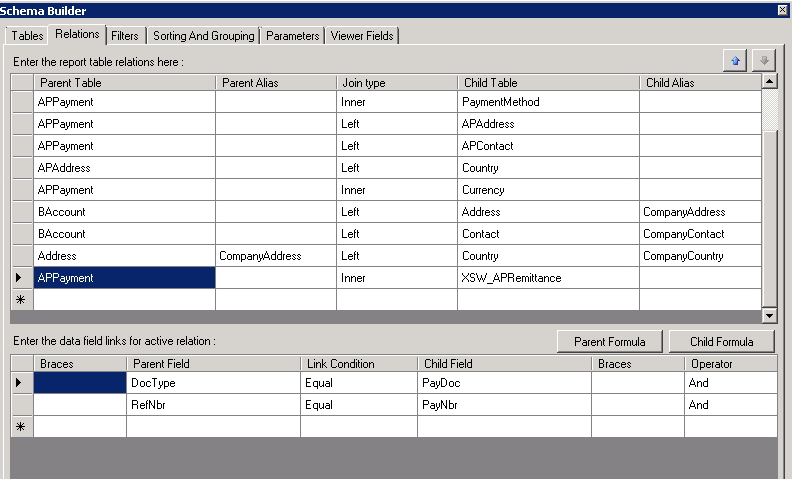
This is exactly what we need to add to report. Well I will skip adding a view to report, please refer to my earlier blogs for that. Just mention, Key fields should be PayNbr, PayDoc and RowNumber.
Added a group
And then added 3 fields to report
That is all,
Best Regards,
Sergey.